
In a marketing spend platform, configuration means changing how it works through settings, such as budget levels, approval rules, notifications, templates, dashboards and access rights, without writing code. Customisation means the vendor writes new code for you. A platform that fits a large company through configuration is faster to roll out, cheaper to run and safer to upgrade. Ask every vendor to mark each of your requirements as standard, configurable or custom, in writing.
Every vendor in a selection will say their platform is configurable. The word has stopped meaning much. The useful question is narrower: for each thing your company does differently, will the platform handle it through settings your team can change, or through code only the vendor can change?
That difference decides how long implementation takes, what it costs, how painful upgrades are, and whether a new region or a reorganisation next year means a change request or an afternoon's work. This guide sets out what should be configurable in a marketing spend platform, how to test each one, and how to keep the custom part small.
What is the difference between standard, configurable and custom?
Standard works the same for everyone. Configurable is set up for you without code. Custom is built for you in code.
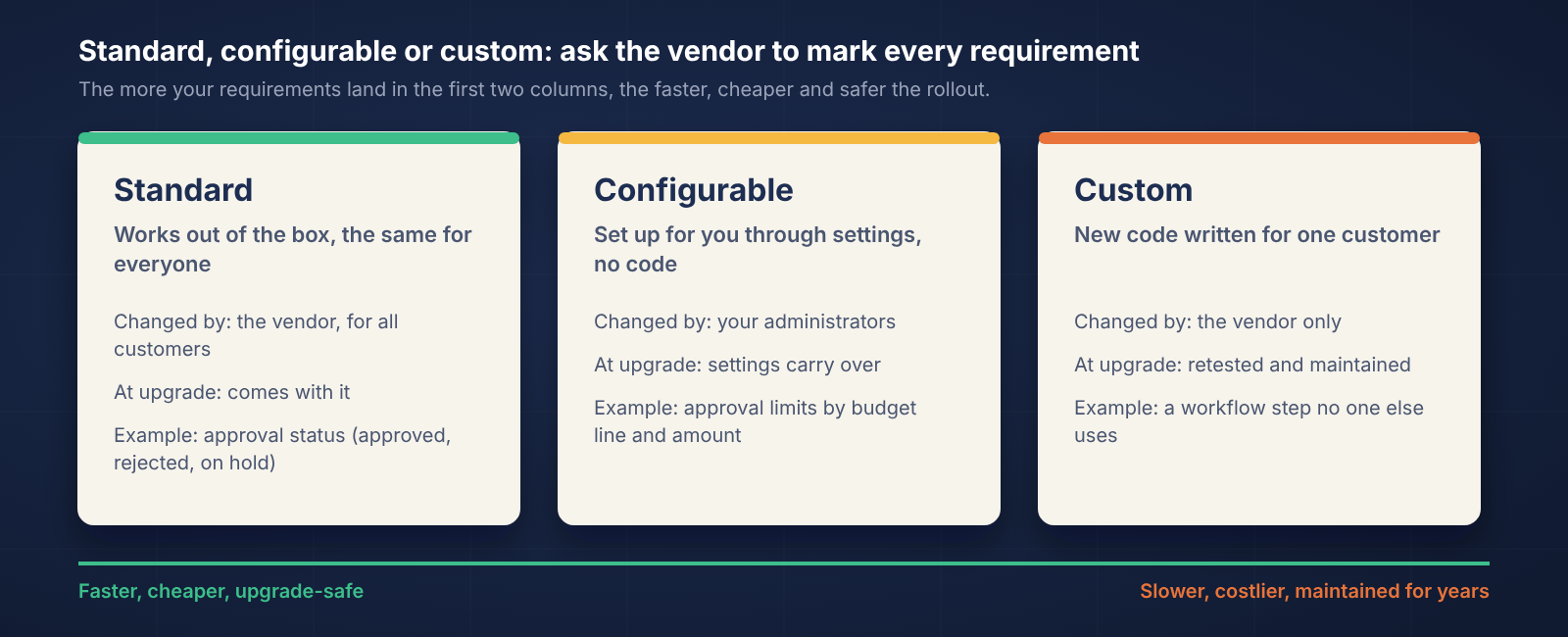
Standard: the feature works out of the box, the same way for every customer. Example: an approval request shows its status as requested, approved, rejected or on hold.
Configurable: the feature is set up to match your company through settings, during implementation and afterwards. Example: your approval limits by budget line and amount. Your administrators can change them later without the vendor.
Custom: the vendor writes code that only you use. Example: a report or workflow step no other customer has. It needs the vendor to change it, test it at every upgrade and support it for as long as you use it.
Some custom work is normal in a large company. The aim isn't zero; it's knowing exactly what is custom before you sign, and keeping it to the things that are genuinely unique to you.
What should be configurable in a marketing spend platform?
Seven things that differ in every large company. If any of them needs code, expect a longer and more expensive project.
What should be configurable | Why it differs between companies | How to test it in the demo |
|---|---|---|
Budget structure and hierarchy | Levels, dimensions (brand, region, channel, activity) and naming are different in every company | Send your real hierarchy beforehand; ask them to add a level live |
Approval rules | Limits depend on the budget line, the amount and the type of action | Give them three of your rules; ask them to route a test request |
Workflows | Which steps a brief, estimate or invoice goes through, and who acts at each | Ask them to add a step to an existing workflow on screen |
Notifications | Who is told what, when, and on which channel | Ask what an approver receives and whether it can be acted on from a phone |
Templates and checks | Vendor templates by medium, and which invoice checks run | Ask to switch one invoice check off and back on |
Dashboards and reports | Each role needs a different view of the same spend | Ask them to build a new view for a regional head while you watch |
Role-based access | Who sees which budgets, and who can approve, edit or only view | Log in as two different roles and compare what each can see |
The demo tells you more than the RFP answers. "Yes, it's configurable" in a spreadsheet costs the vendor nothing; changing a setting live, on your structure, is hard to fake.
How do you keep custom development small?
Get it in writing, challenge every custom item, and start with one team.
Ask for a standard / configurable / custom column on every requirement in your RFP, filled in by the vendor and attached to the contract.
Challenge each custom item. Often there's a configurable way to get most of the result if your process bends slightly. Decide whether the rest is worth code you'll maintain for years.
Ask who owns custom code at upgrade time, and whether it's included in support.
Start with one module for one team. A pilot shows quickly which requirements were really unique and which were habit.
What are the warning signs that a platform isn't really configurable?
The answer to "can it do this?" is always "yes" and never "here's how".
Every change in the demo is "something we'd set up in implementation".
Adding a budget level, an approval step or a user role needs a change request.
Implementation estimates grow each time you add a requirement, even small ones.
The vendor can't tell you which of their other customers run without custom code.
What should an RFP response template for configurability look like?
Use this: paste these columns into your RFP and ask every vendor to fill them in for each requirement. Then score the answers the same way for every vendor.
Requirement | Standard, configurable or custom? | If configurable: who can change it later? | If custom: effort, and who maintains it at upgrade? | Shown working in the demo? |
|---|---|---|---|---|
Example: budget hierarchy with brand, region, channel and activity | ||||
Example: approval limits by budget line and amount | ||||
Example: view-only access for auditors |
How to score each vendor
Score each requirement: 3 standard, 2 configurable by your own administrators, 1 configurable only by the vendor, 0 custom.
Subtract 1 if it wasn't shown working in the demo.
Multiply by the requirement's weight: must-have ×3, should-have ×2, nice-to-have ×1.
Add up each vendor's total, and list every custom item separately, because those are the costs that keep coming back.
How configurable is Brandintellé?
Brandintellé is built as one product configured for each company, so what differs between large companies is handled through settings wherever possible.
Budget structure: the hierarchy is built to your own dimensions (brand, region, channel, medium, activity and any custom dimension), with no fixed number of levels. Budget, outlook, available and consumed show at line-item level every month.
Approvals: approval rules are configured by budget line and by amount, matching your delegation-of-authority policy. Every request shows its status, and rejections carry a reason.
Notifications: approvers are alerted by email and on mobile, and can approve, reject, comment or hold from their phone.
Templates and checks: vendors upload through templates for each medium, and the ten automated invoice checks are configured per client.
Dashboards: media, brand and geography dashboards show the same spend from different angles, and the AI Workspace answers questions in plain language from your data.
Role-based access: each person sees and acts only on the budgets and steps their role allows; auditors can be given view-only access.
Where a requirement genuinely needs something new, we say so before the contract, not during implementation.
"Configurable" is the most overused word in software selection. Ask to see it changed live, on your own structure, and the word starts to mean something again.
See how Brandintellé configures to your budget, approvals and roles