
Integrating a marketing spend platform with SAP means agreeing, document by document, what moves in which direction and when. Masters, budget balances, PO numbers and payment status come from SAP. Purchase requisitions, service entries, accruals and checked invoices go to SAP. Everything in between (the detailed plan, approvals, estimates, proof and deviations) stays in the marketing spend platform, which is the system of record for it.
When finance and IT evaluate a marketing spend platform, the SAP integration is usually where the real questions start. Not "can you connect to SAP?", since every vendor will say yes, but "what exactly connects, who builds it, and what happens when something goes wrong?"
This guide follows one campaign from budget to payment and shows what should cross between the two systems at each step. Then it covers the parts of the landscape beyond SAP that a large company will also ask about: identity, media data and reporting.
How does one marketing campaign move between a spend platform and SAP?
In eight steps. Four documents go to SAP, four kinds of data come back, and the platform keeps the detail that ties them together.
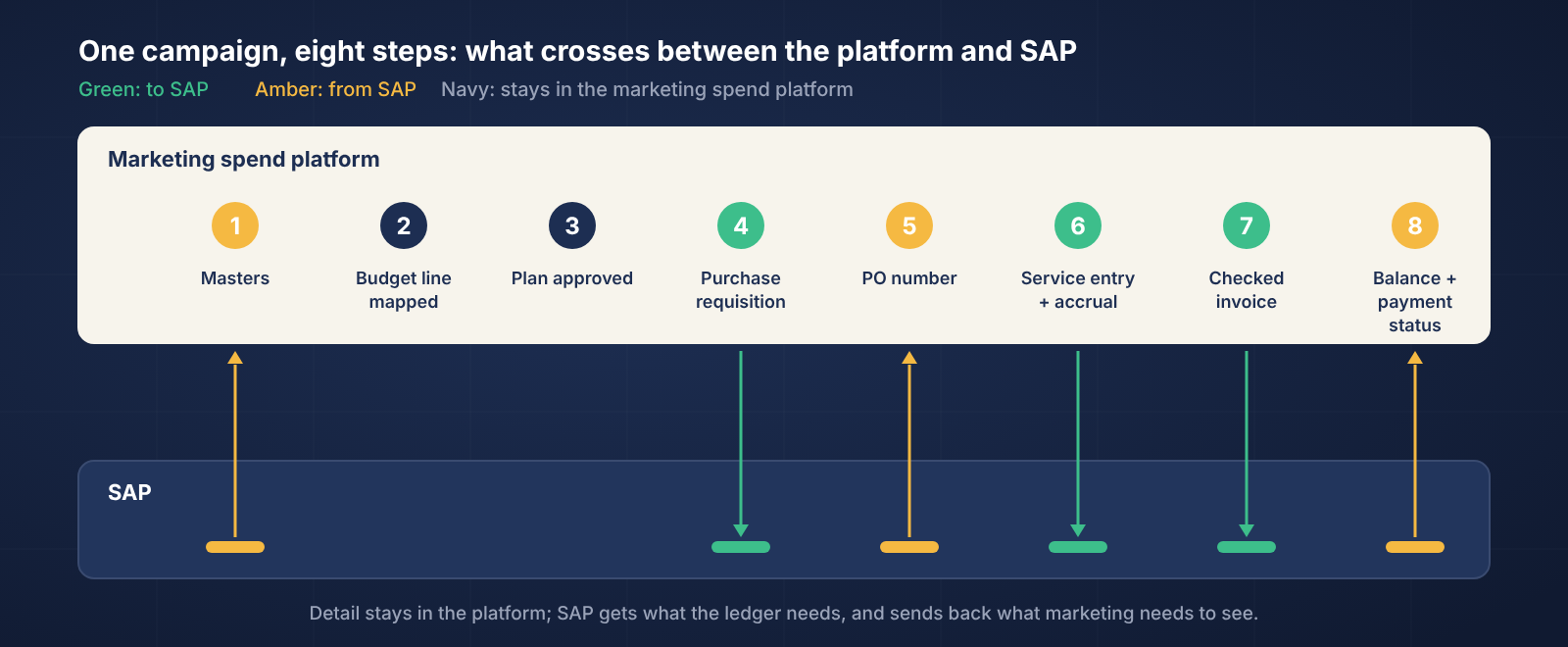
Masters come in. Vendors, cost centres, WBS elements or internal orders, and GL accounts are synced from SAP, so every plan uses the same codes finance does.
The budget line is mapped. Each line in the marketing budget is linked to the SAP cost object that funds it. The platform holds the detail underneath (brand, region, channel, activity); SAP holds the cost object.
The plan is approved. Brief, estimate and approvals happen in the platform. SAP doesn't need to see them, and shouldn't have to.
A purchase requisition goes to SAP. Once the plan is approved, the platform raises the requisition against the mapped cost object.
The PO number comes back. SAP creates the purchase order, and its number is linked to the plan line it belongs to. From now on, every document carries it.
Work completion goes to SAP. When the agency or vendor confirms the work, with proof, the platform sends the service entry, and the month-end accrual is calculated from it.
A checked invoice goes to SAP. The invoice is matched against the PO and the proof in the platform, then sent to SAP for posting with the GL and tax details confirmed.
Budget balance and payment status come back. SAP's figures flow back to the budget line, so marketing sees the same remaining budget and payment status finance does.
What should an SAP integration map include?
A one-page table, agreed before implementation starts, that lists every document, its direction, the SAP object it touches, and when it moves.
What moves | Direction | SAP object | When |
|---|---|---|---|
Vendor, cost centre, WBS / internal order, GL masters | SAP → platform | Master data | On a schedule |
Purchase requisition | Platform → SAP | PR against cost object | When the plan is approved |
Purchase order number | SAP → platform | PO | When the PO is created |
Service entry / work completion | Platform → SAP | Service entry against PO | When work is confirmed with proof |
Accrual (provision) | Platform → SAP | Journal at period end | Month-end close |
Approved invoice, with GL and tax | Platform → SAP | Invoice posting | After the match against PO and proof |
Budget balance | SAP → platform | Cost object balance | On a schedule |
Payment status | SAP → platform | Payment against invoice | When payment runs |
If a vendor can't fill in this table for you in writing, the integration hasn't been designed yet.
Who should build and own the SAP integration?
The platform vendor, with an SAP partner who already knows its interfaces. Your IT team approves the design and the security; it shouldn't have to build it.
In our experience, integrations fail on ownership more often than on technology. Agree three things in the contract: who builds the interfaces, who monitors them after go-live, and who fixes them when SAP is upgraded or a field changes. The vendor that owns all three has a reason to design it properly.
What happens when the integration fails or SAP is unavailable?
Nothing should be lost. Messages should wait in a queue and retry, and failures should show up on a screen someone checks, not in a log nobody reads.
Most enterprise landscapes route these interfaces through middleware such as SAP Integration Suite. Configured properly, it holds messages until SAP is available again. Ask the vendor to show you what a failed document looks like, who is alerted, and how it is resent. A requisition that silently never reached SAP is the kind of gap auditors find a year later.
What else beyond SAP should a marketing spend platform connect to?
Identity, media data and reporting. Large companies evaluate all three alongside the ERP.
Identity. Ask how users sign in, whether it supports your single sign-on and multi-factor authentication, and how access is removed when someone leaves.
Media and platform data. Delivery and spend data from digital platforms, TV ratings and agency files should flow in without anyone retyping it. This is what lets the platform check an invoice against what was actually delivered.
Data and reporting. Ask whether reporting runs inside the platform, and whether data can be taken out through APIs into your data warehouse if you want it there too.
What should you test before an SAP integration goes live?
Use this: hand these ten test cases to your IT team and the vendor for user acceptance testing. Every one should pass, with evidence, before go-live.
# | Test | What should happen | Pass / fail |
|---|---|---|---|
1 | A new vendor is created in SAP | It appears in the platform after the next sync, with the same vendor code | |
2 | A budget line is mapped to a WBS element or internal order | Spend on that line rolls up to the right SAP object | |
3 | A plan is approved in the platform | A purchase requisition is created in SAP against the mapped cost object | |
4 | SAP creates the purchase order | The PO number comes back and is linked to the right plan line | |
5 | Work is confirmed with proof | The service entry posts in SAP against the right PO line | |
6 | Month-end close runs | The accrual posts in SAP and matches the platform's figure | |
7 | An invoice quotes the wrong PO | It is stopped in the platform and never reaches SAP | |
8 | An approved invoice is sent to SAP | It posts with the correct GL account and tax details | |
9 | The invoice is paid in SAP | Payment status updates in the platform | |
10 | SAP is unavailable for an hour | Documents wait in a queue, an alert is raised, and they post once SAP is back, with nothing lost or duplicated |
After go-live, check once a month that the budget balance in the platform matches SAP for every mapped cost object.
How does a Marketing Spend Platform like Brandintellé integrate with SAP and the rest of your stack?
SAP stays your ledger. Brandintellé is the system of record for everything before and after it, connected in both directions.
Two-way SAP integration. Purchase requisitions, purchase orders, service entries and invoices move between Brandintellé and SAP, and masters such as vendors, WBS elements and cost centres are synced from SAP. Budget lines map to WBS elements and internal orders.
Accruals posted from work completion. Brandintellé calculates the provision from confirmed work and posts it to SAP.
Invoices checked before posting. Each invoice is matched against the PO and proof, validated automatically, and posted with the GL and tax details confirmed. Budget balances are fetched back from SAP.
We own the integration. Brandintellé builds it with certified SAP partners who already know its interfaces.
Media data connected. Google, Meta are connected live; TV is reconciled four ways against the estimate, the schedule, ratings data and the channel's bill; agency files are uploaded through templates for each medium.
APIs and reporting. Brandintellé's APIs connect it to the rest of your landscape. Reporting runs inside the platform, with dashboards for media, brand and geography and an AI Workspace that answers questions in plain language from your data, so a separate reporting layer isn't needed.
For a multi-country rollout, each market's company codes, currencies and tax rules are configured during implementation.
Every vendor will say they integrate with SAP. Ask them to fill in the integration map before the demo, and you'll know which ones mean it.